Mac app · free
DisplayShift
Plug in a monitor and choose which windows move over.
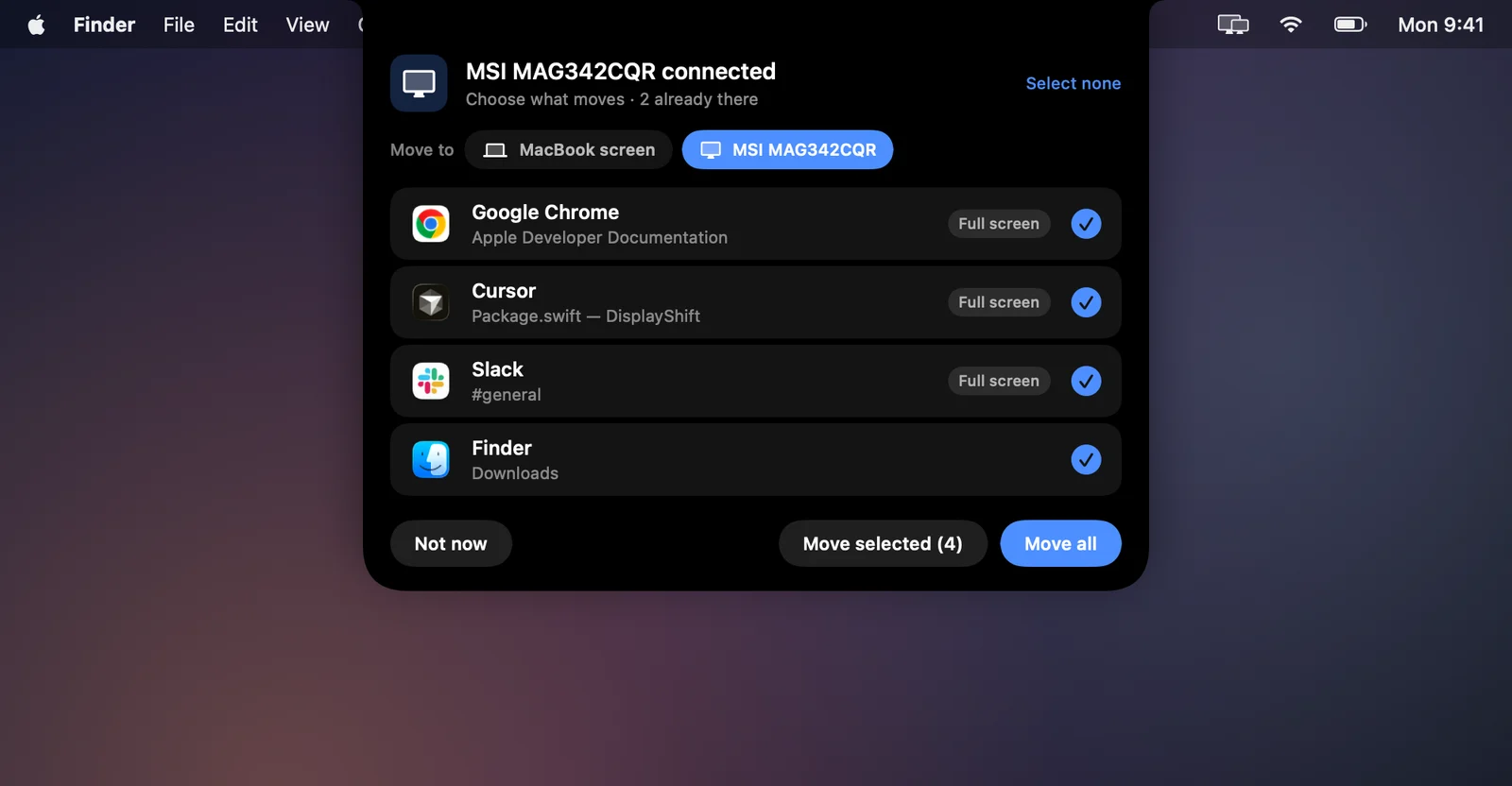
A free menu bar app for anyone who docks a MacBook. When a display connects, a panel drops out of the notch with every open window listed, fullscreen apps and other desktops included. Tick what should move, pick the screen, done. It also sends everything back to the MacBook in one press.
v1.3.0 · 0.9 MB zip · macOS 14 Sonoma or later · Apple silicon and Intel
What it does
The window shuffle, handled
Picks up the moment you plug in
A short chime and an animation in the notch confirm the display, then the picker lists every window that is not on it yet.
Every window, every desktop
Windows on other Spaces and in fullscreen are included, which is exactly where macOS usually strands them.
Fullscreen aware
Fullscreen apps leave fullscreen, move, and go fullscreen again on the new screen. Ones already there are left alone.
Back to the MacBook in one press
Switch the destination to the MacBook screen, or use the one-press buttons in the menu bar before you unplug.
Built for docks and multiple monitors
USB-C, Thunderbolt, HDMI or a dock. Monitors that wake a second apart count as one event, and identical models are numbered.
Private by design
No network access, no analytics, no account. Saved layouts store a hash of each window title, never the title.
Screens
What you will see
Panel shots are rendered from the app's own SwiftUI code with a sample window list, so nobody's private window titles end up on this page. The settings window is a straight screen capture.
Tick what moves. Windows already on the monitor are counted, not listed.UI render, sample windows Switch the destination to send windows back to the MacBook.UI render, sample windows Connect: the link draws in and the monitor lights up.UI render, sample windows Disconnect: the link snaps and the app tells you where the windows went.UI render, sample windows No notch? It floats just under the menu bar instead.UI render, sample windows Progress while fullscreen apps hop across.UI render, sample windows Settings: one-press moves, and what to do on connect.Screen capture
Install
Four steps and you are done
The only unusual step is the first launch, because this build is signed but not yet notarized by Apple.
Download and unzip
Download the zip below and double-click it. Drag DisplayShift into your Applications folder.
Open it once
The first launch shows a warning that Apple could not check the app, because this build is not notarized yet. Click Done, then open System Settings, Privacy and Security, scroll down and click Open Anyway next to DisplayShift.
Follow the setup
DisplayShift walks you through the rest: it moves itself into Applications, asks for Accessibility access once and ticks it off as soon as you switch it on, then asks whether to open at login. If a switch looks on but nothing happens, click Reset and try again.
Plug in a monitor
That is it. DisplayShift lives in the menu bar and opens the picker whenever a display connects.
Privacy
Permissions, and what it does with them
- Makes no network connections. There is no analytics, telemetry or update check.
- Reads window positions, sizes, titles and owning app through the macOS Accessibility API, only to list and move windows.
- Stores preferences and saved layouts in its own preferences file. Layouts keep a SHA-256 hash of each window title, never the title itself.
- Signed and built with the hardened runtime. It runs no scripts or helper processes.
Release notes
What changed
v1.3.0Sep 28, 2026
- A setup assistant on first launch: it moves the app into Applications, asks for Accessibility once and waits for it to work, then asks whether to open at login.
- No more stuck permission switch. If an older approval gets in the way, the app clears it and asks again by itself.
- Opening a newer copy closes the older one, so two copies never run at once.
v1.2.1Sep 28, 2026
- Signed with my own developer certificate.
- The zip now opens cleanly with any unzip tool, not just Finder.
v1.2.0Sep 28, 2026
- Multiple monitors: displays that come up a second apart on one dock count as one event.
- Identical monitor models are numbered left to right.
- Docks that drop their displays during sleep no longer trigger the picker on wake.
v1.1.0Sep 28, 2026
- The notch picker, with a Move to switch for any connected screen.
- Connect and disconnect animation and chime, both optional.
- Floating pill for Macs without a notch. Universal build for Intel Macs.
v1.0.0Sep 14, 2026
- First release: move every window to any display in one press, with layout memory.
SwiftSwiftUIAppKitAccessibility APICoreGraphics
Want something like this built for you?
I take on mobile, desktop and AI projects, from a focused utility to a full product.