Mac app · free
Scrollwise
Natural scrolling on the trackpad, classic on the mouse. Automatically.
macOS has one scroll direction switch for every device, so anyone who uses both a trackpad and a mouse flips it back and forth all day. Scrollwise checks which device each scroll comes from and fixes the direction on the fly. Leave the macOS switch alone and never touch it again.
v1.1.0 · 0.4 MB zip · macOS 14 Sonoma or later · Apple silicon and Intel
What it does
One switch was never enough
Knows which device you are using
It asks macOS which device sent each scroll, so a trackpad and a mouse can scroll in opposite directions at the same time.
Nothing to switch
Connect or disconnect a mouse whenever you like. The direction is right the moment you touch it.
Any mouse, Magic Mouse included
Wheel mice over Bluetooth or USB, and the Magic Mouse, which macOS otherwise treats like a trackpad.
See it working
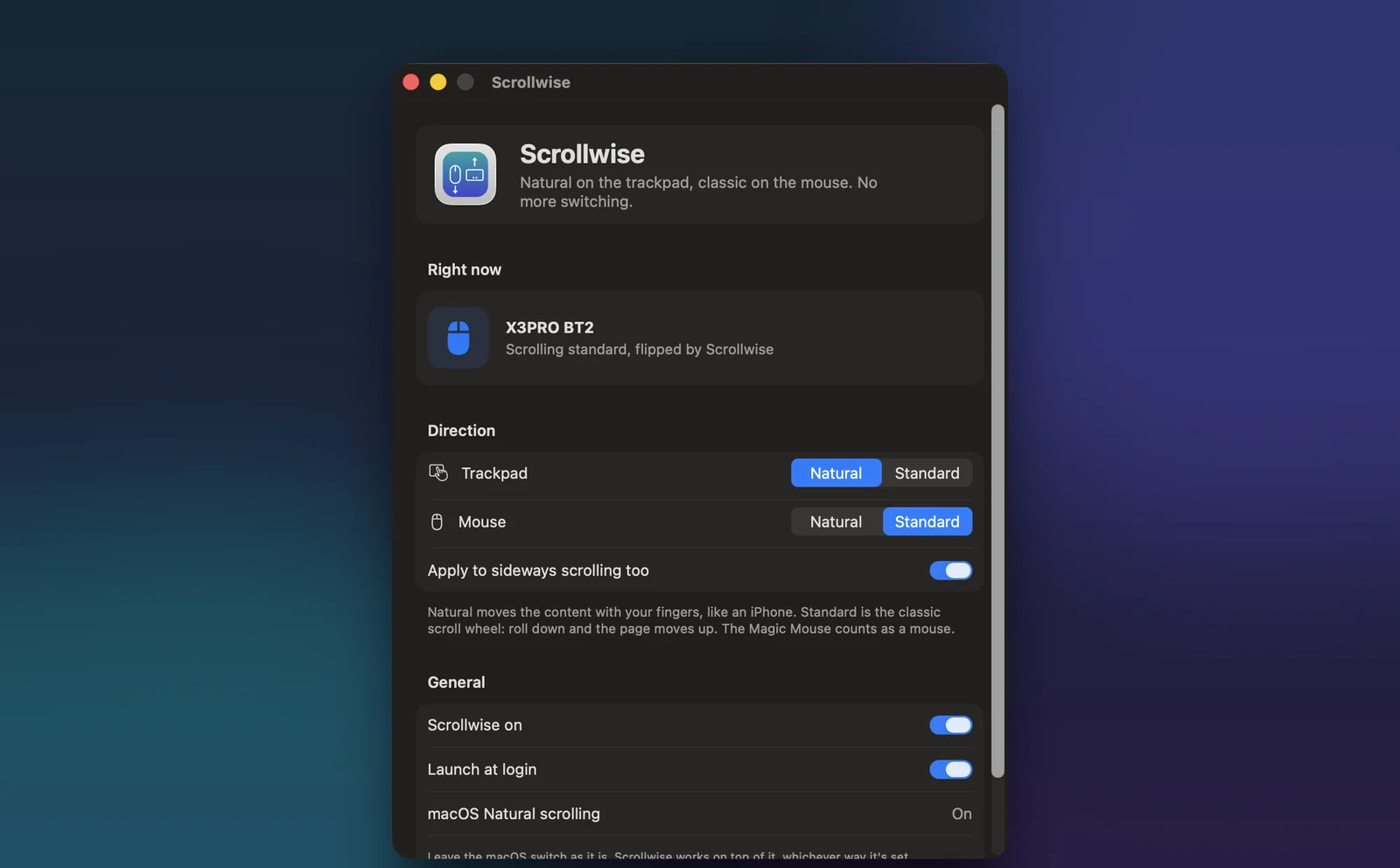
A live readout shows the device it just saw and whether it flipped the scroll, so you know it is doing its job.
Your call per device
Natural or standard for the trackpad and the mouse separately, with sideways scrolling included or left alone.
Private and light
It only looks at scroll and touch events, never keystrokes, and makes no network connections.
Screens
What you will see
Everything on one screen. Natural or standard per device.Screen capture
Install
Four steps and you are done
The only unusual step is the first launch, because this build is signed but not yet notarized by Apple.
Download and unzip
Download the zip below and double-click it. Drag Scrollwise into your Applications folder.
Open it once
The first launch shows a warning that Apple could not check the app, because this build is not notarized yet. Click Done, then open System Settings, Privacy and Security, scroll down and click Open Anyway next to Scrollwise.
Follow the setup
Scrollwise walks you through the rest: it moves itself into Applications, asks for Accessibility access once and ticks it off as soon as you switch it on, then asks whether to open at login. If a switch looks on but nothing happens, click Reset and try again.
Scroll
Leave the macOS Natural scrolling switch as it is. Scroll with the trackpad, then the mouse, and watch the Right now panel. If Scroll Reverser or a similar app is running, Scrollwise offers to quit it so the two do not cancel out.
Privacy
Permissions, and what it does with them
- Makes no network connections. There is no analytics, telemetry or update check.
- Sees scroll and touch events only, never keystrokes, and does not record what you scroll.
- Stores nothing but its own preferences.
- Signed and built with the hardened runtime. It runs no scripts or helper processes.
Release notes
What changed
v1.1.0Sep 28, 2026
- A setup assistant on first launch: it moves the app into Applications, asks for Accessibility once and fixes a stuck permission by itself.
- Asks whether to open at login instead of switching it on quietly.
- Opening a newer copy closes the older one, so two copies never flip the same scroll.
v1.0.0Sep 28, 2026
- First release: natural on the trackpad, standard on any mouse, with a live device readout.
SwiftSwiftUIQuartz event tapsIOKit
Want something like this built for you?
I take on mobile, desktop and AI projects, from a focused utility to a full product.