Windows and Mac app · free and open source
Stackyard
Every SDK on your machine, which projects use it, and what's safe to remove.
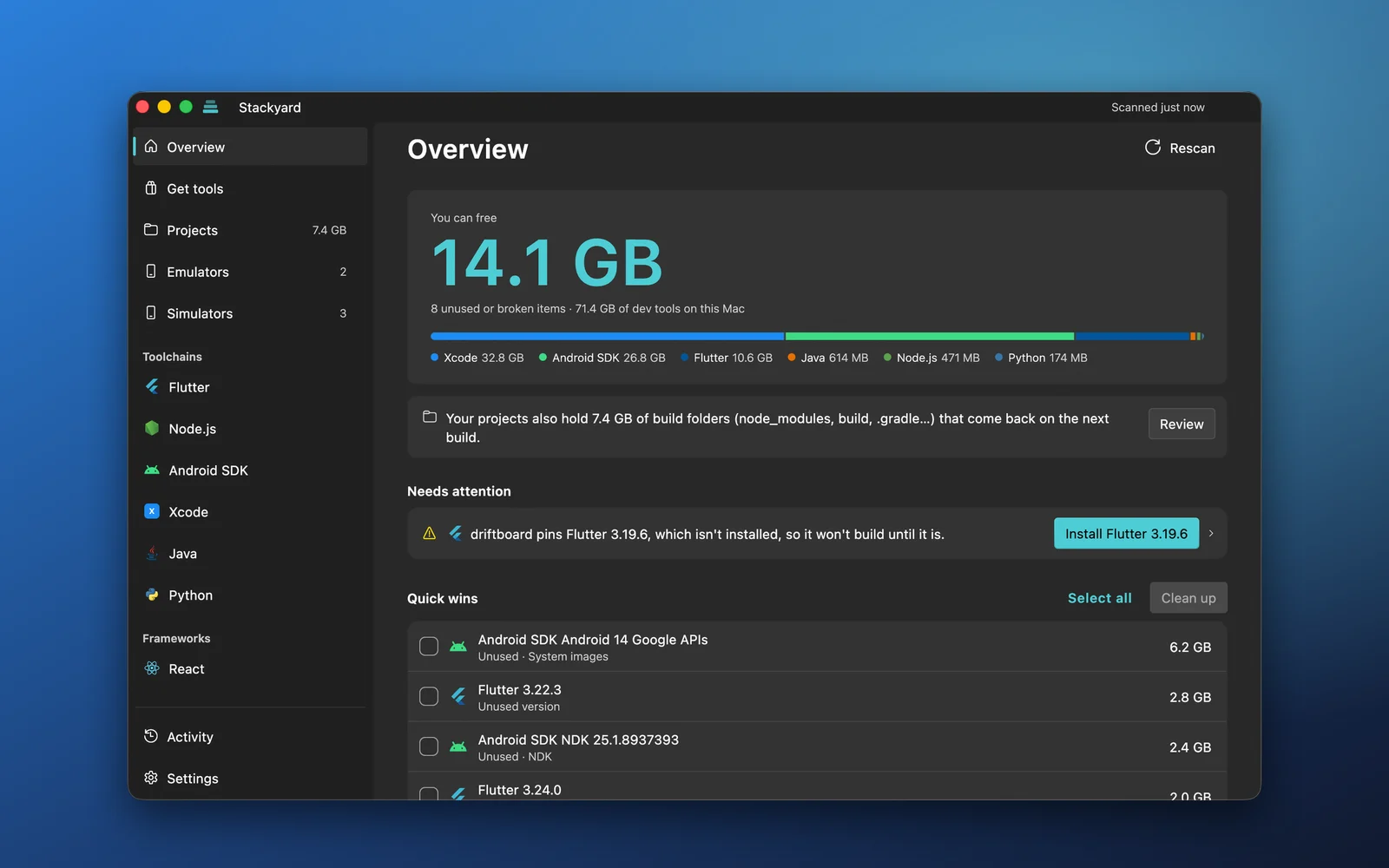
Version managers install SDKs; nothing tells you that you have six Flutter versions, three Android NDKs and a 13 GB emulator you haven't opened in a year. Stackyard scans your machine and your projects, shows what each version is used by, explains every problem in plain words with a button that fixes it, and frees the space you don't need. Free and open source.
v1.0.2 · Windows 10 or 11, or macOS 12 or later · free and open source
In motion
Watch it work
Short loops of the real Stackyard on a sample machine, showing how each part behaves.
What it does
Your dev machine, finally in order
Every tech in one window
Flutter (FVM or standalone), Node (nvm, fnm, Volta), the Android SDK, Xcode simulators, Java, Python, .NET and Gradle, plus the React, Next.js, Vue and other frameworks your projects use.
Knows which project uses what
It reads .fvmrc, .nvmrc, package.json, Gradle files, .python-version and more, so every version shows the projects that need it, and the ones nothing uses stand out.
Problems come with a fix button
A missing version a project pins, a broken JAVA_HOME, dead PATH entries, a Java too new for a Flutter app's Gradle: each is explained in plain words with a button that fixes it.
Safe by design
You see every step before it runs. Removals go to the Recycle Bin or Trash, installed programs use their own uninstaller, and Stackyard never edits your projects.
Get any version
A marketplace of SDKs and CLIs, every version listed from the publisher's own feed, downloaded from them and checked against their published hash.
Emulators and simulators
Android emulators and iOS simulators with their size and last start, and the simulator runtimes Xcode keeps (often 8 GB each), with what uses them.
Screens
What you will see
The real app on a sample machine, so the project names are made up.
Each version and the projects that use it. Every step shown before it runs; removals go to the Trash. Get any version of the tools you build with. Choose the folder and the variables before it installs. Activity keeps the log of everything it did. Simulators, with their size and when they last ran.
Install
Install on Windows or Mac
The download button picks the installer for your system. The Mac app is notarized by Apple; the Windows installer is built from the public source by GitHub Actions.
Download for your computer
The button gives you the installer for your system: Stackyard-Setup.exe on Windows, Stackyard.dmg on a Mac.
Windows: run the installer
It installs for your user only, with no administrator prompt. The installer isn't code signed yet, so Windows may show "Windows protected your PC": click More info, then Run anyway.
Mac: drag it to Applications
Open the DMG and drag Stackyard to Applications. It's signed and notarized by Apple, so it opens like any other app.
Pick your project folders
On first launch Stackyard finds the folders where your projects live and shows how many each holds. Add any it missed, and it scans.
Questions
Stackyard, in short
- Price
- Free
- Requires
- Windows 10 or 11, or macOS 12 or later
- Runs on
- 64-bit Windows, Apple silicon and Intel Macs
- Latest version
- 1.0.2, Oct 15, 2026
- Checked by Apple
- Mac app notarized
- Source code
- Open source, MIT license
What is Stackyard?
- Stackyard is a free, open-source desktop app for Windows and Mac that shows every SDK, toolchain and framework version on your machine (Flutter, Node.js, the Android SDK, Xcode simulators, Java, Python, .NET and more), which of your projects use each one, and what's safe to remove. It also fixes common setup problems with one click.
Is Stackyard free?
- Yes. Stackyard is free and open source under the MIT license, with every feature in the free app. The code is on GitHub at github.com/AqibJavedZeepalm/stackyard.
How do I remove old Flutter versions safely?
- Open the Flutter page in Stackyard. Every installed version (FVM or standalone) shows the projects that use it; the unused ones are marked. Remove a version and it goes to the Trash or Recycle Bin, after you've seen exactly what will happen.
How does Stackyard know which project uses which version?
- It reads the files projects pin versions in: .fvmrc for Flutter, .nvmrc and package.json for Node, gradle-wrapper.properties and build.gradle for Android, .python-version and global.json for Python and .NET. Projects without a pin are counted as using the default version.
Can Stackyard delete my projects or code?
- No. Stackyard never edits or deletes your projects. Project cleanup only removes rebuildable folders such as build, node_modules, .dart_tool and Pods, which come back the next time you build, and it shows each folder before anything happens.
Does Stackyard clean up iOS simulators and Android emulators?
- Yes. It lists every Android emulator and iOS simulator with its size and when it last ran, and lets you start, erase or delete them. On a Mac it also shows Xcode's simulator runtimes, often 8 GB each, with the simulators that use them.
Is Stackyard safe to install?
- The Mac version is signed with my Apple Developer ID and notarized by Apple. The Windows installer is built from the public source by GitHub Actions; code signing for it is being set up, so for now Windows may ask you to confirm before it runs.
Privacy
Permissions, and what it does with them
- Everything runs on your computer. No account and no telemetry.
- It goes online only to list versions of the tools it manages and to download the ones you choose.
- It reads your project folders to see which versions they use, and never changes your projects.
- Every change is shown before it runs; removals go to the Recycle Bin or Trash by default.
- Open source under the MIT license, so anyone can check what it does.
Feedback
Tell me what Stackyard should do next
Ask for a feature, report something that went wrong, or leave a review. It comes straight to me, and I read every one.
Release notes
What changed
v1.0.2Oct 15, 2026
- Glass now works on Windows 11: the window uses acrylic, so the slider lets your desktop show through. Windows 10 stays solid.
- The first launch on a Mac is smoother, the setup buttons respond reliably, and settings are saved more safely.
- Notifications never hold up the window while macOS asks for permission.
v1.0.1Oct 15, 2026
- First public release, for Windows and Mac.
- Flutter, Node.js, the Android SDK, Xcode simulators, Gradle, Java, Python and .NET, with the projects that use each version.
- A marketplace of SDKs and CLIs, a setup assistant that finds your project folders, live progress for every job, and a glass window on both systems.
FlutterDartFluent UIGitHub Actions
Want something like this built for you?
I take on mobile, desktop and AI projects, from a focused utility to a full product.